Add-Edit Earning dialog box
With the Add/Edit Earning dialog boxes, you can change and/or adjust earnings records.
Note: The Add Earning dialog box has the same fields as the Edit Earning dialog box.
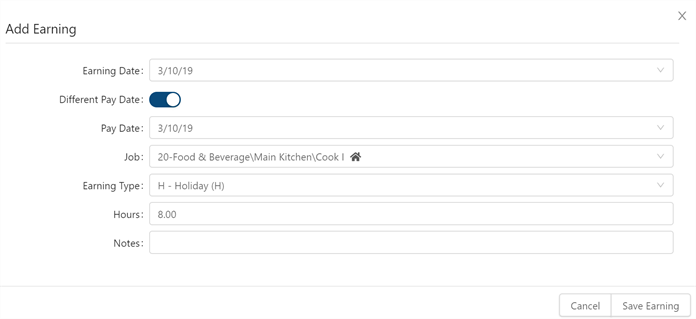
Fields on the Add-Edit Earning dialog box
| Field | Description | Notes |
|---|---|---|
|
Earning Date |
Date when the earning is added. |
|
|
Different Pay Date |
Turn on ( |
|
|
Pay Date |
Date on which the earning will pay out. |
This field appears only if the Different Pay Date toggle is turned on ( |
|
Job |
Job to which the earning is applied. Select the job from the drop-down list. |
|
|
Earning Type |
Earning type to be applied. For example, Paid Time Off (PTO) or Holiday (H). Select the earning type from the drop-down list. |
|
|
Hours |
Hours used to calculate the earning. |
|
|
Notes |
Enter notes to be included with the earning. |
|
|
Cancel |
Closes the dialog box without applying your changes. |
|
|
Save Earning |
Applies your changes and closes the dialog box. |
|
 ) if the earning will pay out on a date other than the Earning Date.