Changing the database or property
You can change the database or property from any screen.
-
In the upper-right corner of any screen, select the name of your property (
 ).
).
The Select Property and Database dialog box appears. Click here for field descriptions.
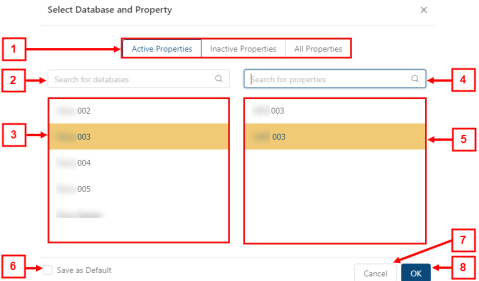
Fields for the Select Database and Property dialog box
# Field Description Notes 1
Property filters
Property filters include:
-
Active Properties
-
Inactive Properties
-
All Properties
Default: Active Properties is selected.
2
Search for databases
Enter the name of a database in the search field. The database list updates as you type.
3
Database list
Select a database from the list of available databases.
4
Search for properties
Enter the name of a property in the search field. The property list updates as you type.
5
Property list
Select a property from the list of available properties.
6
Save as Default
If selected, the current database and property will be saved as the default selection.
7
Cancel
Closes the dialog box without changing the current database/property.
8
OK
Changes the database/property and closes the dialog box.
-
-
If necessary, you can find a database or property by doing the following:
Search for the desired database by entering the database name in the Search for databases field.
Search for the desired property by entering the property name in the Search for properties field.
Filter selections by the following options: Active Properties, Inactive Properties, or All Properties.
-
Select the database or property.
-
(Optional) To set the property as the default, select Set as Default.
-
Select Save.
The Unifocus software updates to access the selected property/database.