Editing a portfolio
You can make changes to an existing portfolio from the Portfolio screen.
-
In the upper-left corner of the screen, select Access your applications (
 ).
).
The menu expands. -
Select Setup > Corporate > Portfolio.
The Portfolio screen appears.
-
In the table, edit the name, code, or whether the brand appears in reports.
 Click here for field descriptions.
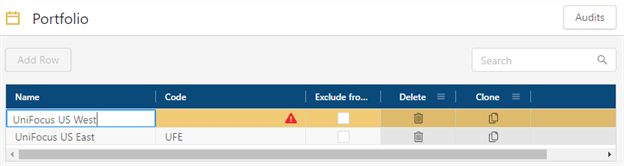
Fields on the Portfolio screen
Field Description Notes Audits
View a history of changes to the screen.
Add Row
Create a new row.

Search
Type your search criteria in the field. The table automatically updates to meet the search criteria.
Code
A unique identifier provided by your organization.
Name
Name of the portfolio.
Exclude from corporate reports
If selected, this portfolio will not appear in reports.

ConflictIndicates that the new row cannot be saved because a required field is empty or contains a duplicate entry.
This icon appears only if you are adding or editing a row.

DeleteRemoves the row from the table.

CloneCreates a copy of the row.
Your changes are saved automatically.
For more information, see Portfolio.