Reservation tab
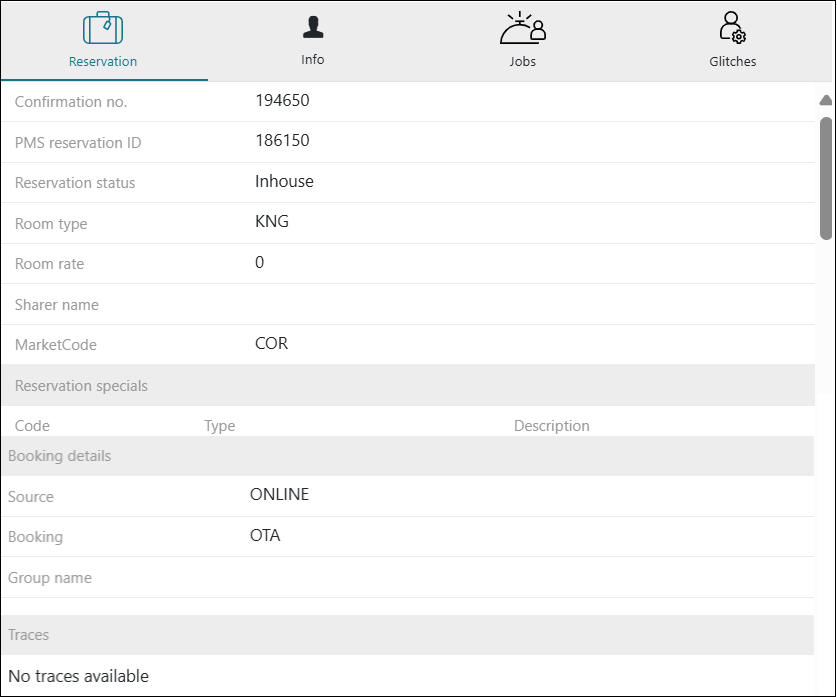
Fields on the Reservation tab
| Field | Description | Notes |
|---|---|---|
|
Confirmation no. |
Confirmation number for the guest reservation. |
Read-only. |
|
PMS reservation ID |
Identification number assigned by the property management system. |
Read-only. |
|
Reservation status |
Displays whether the guest is pre-arrival, in-house, or checked out. |
Read-only. |
|
Room type |
Type of room such as a suite with a king-sized bed or a standard room with two double beds. |
Read-only. |
|
Room rate |
Price the guest is paying for the room, per night. |
Read-only. |
|
Sharer name |
Name of the secondary guest on the reservation, if applicable. |
Read-only. |
| MarketCode | Country code associated with the reservation. |
Read-only. |
| Reservation specials | Code—Specific room code assigned to the reservation. Type—Identifies the room type, such as Specials or Amenities, to specify the category or offering of the room. Description—Provides additional details about the room, such as its location (for example, poolside, first floor) |
Read-only. |
| Booking details |
Source—Platform or service through which the booking was made. Booking—Method or channel used to make the reservation. Group name—Name of the group or organization associated with the reservation, if applicable.(for example, for a convention or business rate). |
Read-only. |
| Traces |
Tracks information from the property management system. |
Read-only. |