Manage Badges screen
The Manage Badges screen displays a list of all employees, employee IDs, and badge numbers for each employee.
Caution: If your company's employee badges are updated by interfaces, any changes you make using the Manage Badges screen will be overwritten the next time an interface file is imported.
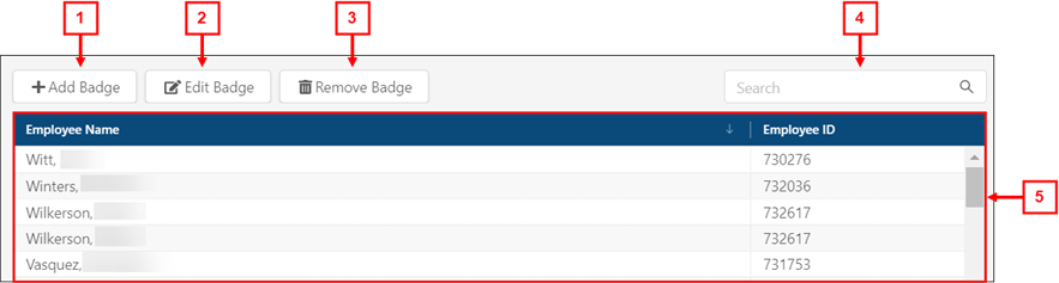
* Personally identifiable information has been obscured or altered in the above image.
Fields on the Manage Badges screen
| # | Field | Description | Notes |
|---|---|---|---|
|
|
Controls | ||
|
1 |
Add Badge ( |
Create a new employee badge number. |
|
|
2 |
Edit Badge ( |
Change the badge number for the selected employee. |
This button is available only if you select a row in the table. |
|
3 |
Remove Badge ( |
Delete the badge number for the selected employee. |
This button is available only if you select a row in the table. |
|
4 |
Search |
Enter a name, employee ID number, or badge number into the field. The list updates to show records matching your search. |
|
| 5 | Table | ||
|
Employee Name |
Name of the employee. |
|
|
|
Employee ID |
Unique identification number for the employee. |
|
|
|
Badge Number |
Unique badge identification number for the employee. |
|
|
 )
) )
) )
)