Threshold Configuration screen
The Threshold Configuration screen allows you to configure the default key performance indicator (KPI) thresholds for performance insights across all operations applications, including Maintenance, Housekeeping, Service, Glitch, and Inspection. These thresholds determine how KPI results are categorized (for example, green, amber, or red) and serve as the default values for all properties.
Note: The threshold configuration screen is the same for all the Operations applications. The available KPIs, threshold names, and threshold fields vary depending on the selected application.
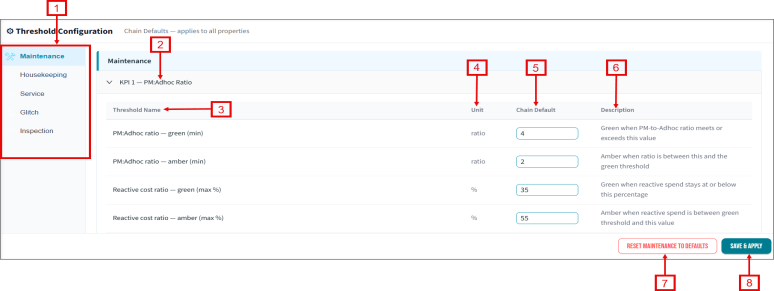
Fields on the Thresholds Configuration screen
| # | Field | Description | Notes |
|---|---|---|---|
|
1 |
Applications |
||
|
Maintenance |
Select to view and configure maintenance KPI thresholds. |
||
|
Housekeeping |
Select to view and configure housekeeping KPI thresholds. |
||
|
Service |
Select to view and configure service KPI thresholds. |
||
|
Glitch |
Select to view and configure glitch KPI thresholds. |
||
|
Inspection |
Select to view and configure inspection KPI thresholds. | ||
|
Threshold Configuration |
The following threshold rows are specific to the Maintenance application. | ||
|
2 |
KPI 1 |
Select the KPI heading to expand the section. |
Displays the threshold values for the selected KPI. |
|
3 |
Threshold Name |
Display the name of the threshold for the selected KPI. Available threshold names include:
|
Available units include Ratio, Percentage (%), Count, and Points. Chain Default—Enter the default threshold value for the selected KPI. |
|
4 |
Unit |
Displays the unit of measurement for the threshold. |
Available units include Ratio, Percentage (%), Count, and Points. |
|
5 |
Chain Default |
Enter the default threshold value. |
|
|
6 |
Description |
Information about the threshold. |
|
|
Action Buttons |
|||
|
7 |
RESET MAINTENANCE TO DEFAULTS |
Restores the maintenance threshold values to their default settings. |
The button name changes based on the selected application. |
|
8 |
SAVE & APPLY |
Save and applies the threshold configurations. |