Recurring Task Standards tab in Labor Standards

Use the Recurring Task Standards tab in the Standards pane in Labor Standards to specify standards for fixed work. Fixed work is any recurring task that is expected to be completed within a set amount of time. For example, cleaning duties lend themselves to task standards as each activity, such as a monthly deep cleaning task, has its own time requirement. The standards you create for this periodic fixed work are added to the day's labor requirement for the defined periods. 

Note: This tab is only available if the Standard Type is set to KBI Related. For more information, see Configuring Planner Settings.

Note: The Standards pane is available only if a job or assignment/sub-assignment is selected. The Standards pane is not available at the property, division, or department levels.
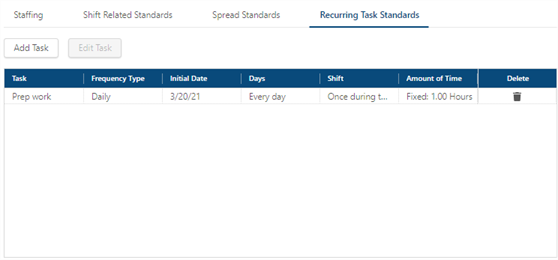
Fields on the Recurring Task Standards tab

Field Description Notes
Controls

Add Task

Add a new task.


Edit Task

Edit the selected task.

This button is only available if a spread standard is selected.

Table

Task

Name of the task.


Frequency Type

How often the task is performed, on a daily, weekly, or monthly basis.


Initial Date

Date on which the task begins.


Days

Displays the frequency of the task:

  • Daily—How many days in the week the task is performed.

  • Weekly—Whether the job is performed every week or every two weeks and on which day(s) of the week the task is performed.

  • Monthly—Day of the month on which the task is performed and the months for which the task is performed.


Shift

Time of day when the task is performed.

  • Occurs During Shift—The task is performed at any time during the specified shift.

  • Occurs Once at—The exact time of day that the task is performed.

  • Repeats every ___ hours, between ___ and ___.—Number of hours after which the task is repeated, as well as the time frame in which the task is completed. For example, Repeats every 2 hours, between 8:00 and 16:00.


Amount of Time

Whether the time needed to complete the work is fixed or variable.

  • Fixed Hours—Number of hours required to complete the work.

    • Enter the total number of hours required to complete the work.

  • Variable Hours—KBI associated with the task. Enter the following information in the table:

    • From Volume/To Volume—Volume range of the standard.

      • Enter 1 in the From Volume field and up to 99999 in the To Volume field, to specify the range. For example, you use the KBI for Total Rooms. You know that you will never have more than 500 rooms, so you would enter 1 in the From Volume field and 500 in the To Volume field.

        Note:If you use a KBI based on the number of rooms, and the time required to perform the variable work increases or decreases with higher volume, you should create and specify additional ranges. You can have multiple ranges for each KBI. Be careful to make the top end of the range a number that is higher than you could ever encounter. In the previous example, if you set the range as 1-500 and then enter 501 rooms (because a room was sold twice in one day), RMS will ignore the 501 and return a 0 standard.

      • Base Hours—Minimum number of hours that it takes to accomplish the task. These are fixed hours.

      • Additional Hours—Number of additional hours required to accomplish the task.

      • Per # Units—Number of units to be completed during the criteria set for the task.


Delete

Deletes the Recurring Task standard.