Salary Distribution
Salary distribution converts a salaried employee's salary to hours. RMS uses the calculated hours to automatically create and fill shifts for these salaried employees.
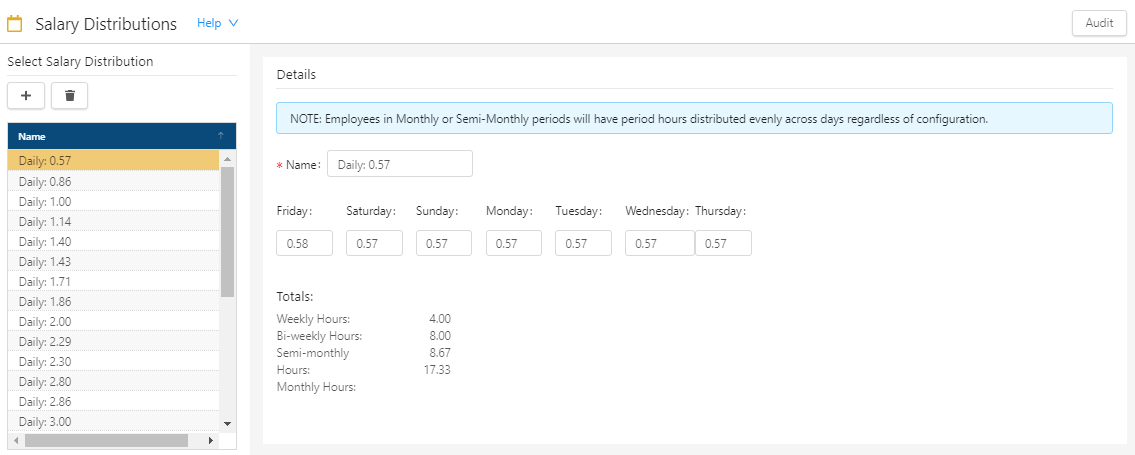
Fields on the Salary Distribution screen
| Field | Description | Notes |
|---|---|---|
|
Audit |
View a history of changes to the screen. |
|
| Select Salary Distribution | ||
|
Add |
Opens the Add Salary Distribution dialog box, where you add a new distribution. |
|
|
Delete |
Deletes the selected salary distribution. |
This button is available only if a Salary Distribution is selected. |
|
Distributions |
Name of the distribution. Select a distribution to view or edit details. |
|
| Details | ||
|
Name |
Name of the distribution. If you edit the name in this field, the name in the Select Salary Distribution list also updates. |
Required. |
|
Days of week |
Amount of the distribution for each weekday. |
|
|
Totals |
Displays the following totals:
|
Read-only. |

