Linen Console screen
The Linen Console screen displays a list of linens removed by room attendants. Room Attendants indicate how many soiled and/or damaged items are removed from each room. These changes are reflected in the first two columns on the console.
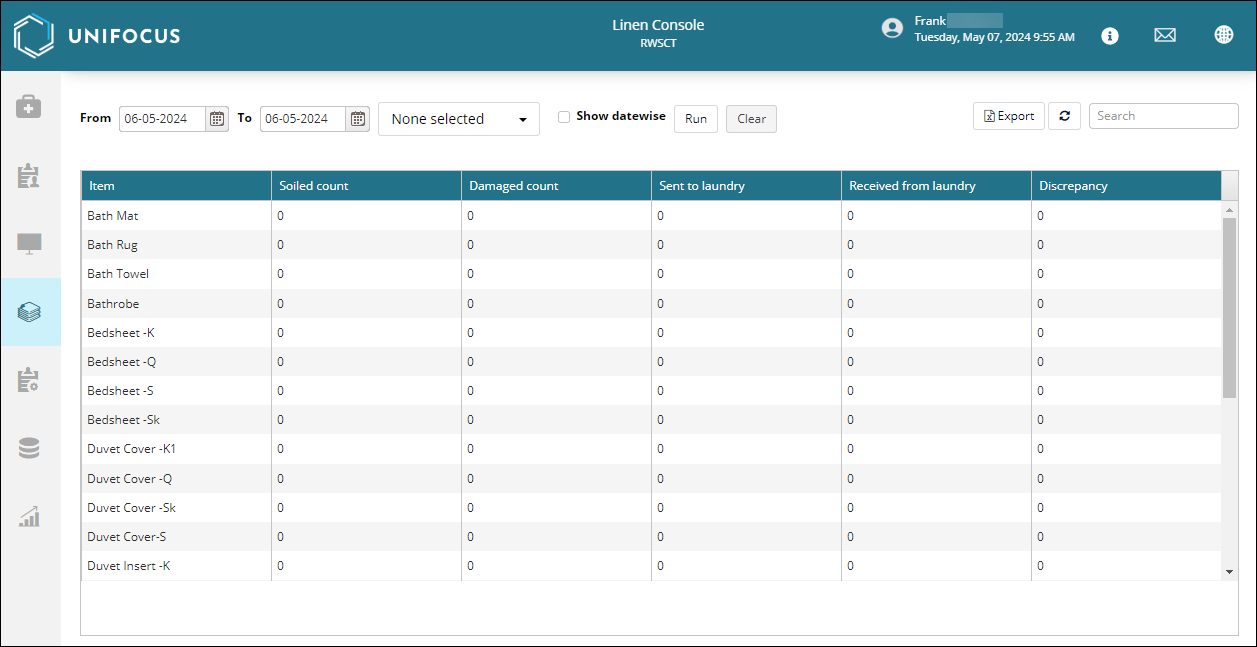
Fields on the Linen Console screen
| Field | Description | Notes |
|---|---|---|
|
From / To |
Select the date range for which to view removed linen. |
|
|
Item filter |
Filter the table by the type of linen. Examples: Bath Mat, Bedsheet, Bathrobe. |
Default: None selected. |
|
Date display controls |
Use these controls to sort the screen by date:
|
|
|
Export |
Export the table to an XLSX file. |
|
|
Refresh |
Refresh the screen. |
|
|
Search |
Search by text or numerical values. |
|
| Table | ||
|
Date |
Date when the item was removed. |
Read-only. This column appears only if you have selected the Show datewise option. |
|
Item |
Item that was removed. Examples: Bath Mat, Bedsheet, Bathrobe. |
Read-only. |
|
Soiled count |
Number of soiled items. |
Read-only. |
|
Damaged count |
Number of damaged items. |
Read-only. |
|
Send to laundry |
Number of items sent to laundry. |
Read-only. |
|
Received from laundry |
Number of items received from laundry. |
Read-only. |
|
Discrepancy |
Number of discrepancies. Indicated by negative numbers, the Discrepancy column shows whether you are potentially short of linen. |
Read-only. |

