Create Task pane
The Create Task pane opens when you right-click a task sheet from the Task Sheet Editor screen of Housekeeping and select Create Task.
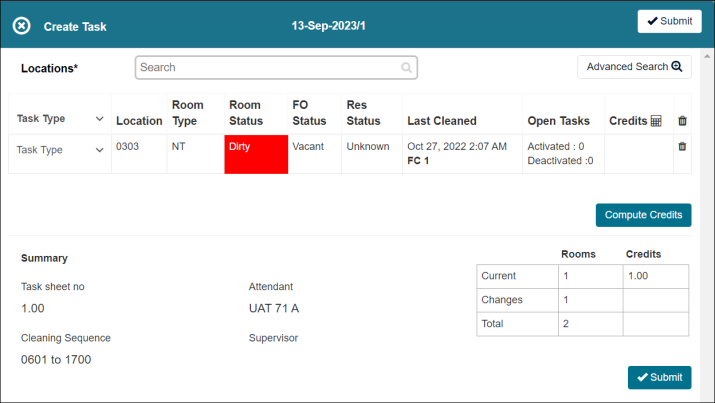
Fields on the Create Task pane
| Field | Description | Notes |
|---|---|---|
|
Locations |
Select the location for which to create a new task. |
|
|
Task Type |
Select the task type for the task that you are creating. |
|
|
Location |
Number associated with the selected location for the task. |
Read-only. |
|
Room type |
Code associated with the room type for the task. |
Read-only. |
|
Room status |
Room status of the room associated with the task. |
Read-only. |
|
FO status |
Room status designated by the front office. |
Read-only. |
|
Res status |
Status of room resident. |
Read-only. |
|
Last Cleaned |
Date and time when the room was last cleaned. If the room was part of the Green initiative, that status will also be indicated. |
Read-only. |
|
Open Tasks |
Number of activated and deactivated tasks. |
Read-only. |
|
Credits |
Total credits associated with the task. |
Read-only. |
|
Delete |
Deletes the line item. |
|
|
Compute Credits |
Totals the credits of all line items. |
|
|
Summary |
The Summary section includes the following information:
|
Read-only. |
|
Submit |
Submits your changes and closes the pane. |