Filters pane
This page describes the Filters pane in the Task Sheet Editor screen of Housekeeping. This pane opens when you select the Filter (  ) button.
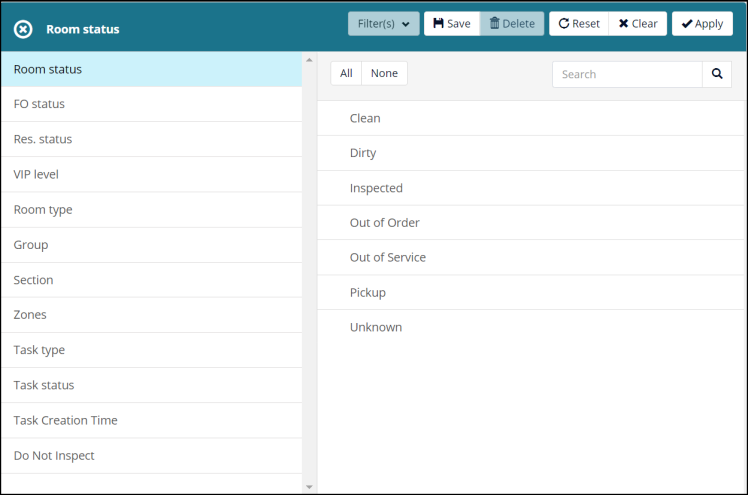
Fields on the Filters pane
| Filter | Description | Notes |
|---|---|---|
| Controls | ||
|
Filters |
Select from previously saved filters, if available. |
|
|
Save |
Saves the current filter settings. |
|
|
Delete |
Deletes the current filter settings. |
|
|
Reset |
Removes applied settings to the current filter. |
|
|
Clear |
Clears a configured filter that is applied to the screen. |
|
|
Apply |
Applies your filter settings. |
|
|
All | None |
|
|
|
Search |
Search for specific filters. |
|
| Filter types | ||
|
Room Status |
Such as Clean, Dirty, Pickup, Inspected, and Out of Order. |
|
|
FO status |
Front Office Status—Choose from either Occupied or Vacant. |
|
|
Res. status |
Reservation Status—Options pulled from PMS. |
|
|
VIP level |
Choose from existing VIP levels in PMS. |
|
|
Room Type |
Choose from existing room types in Housekeeping. |
|
|
Group |
Choose from existing group codes in PMS. |
|
|
Section |
Choose from existing sections as defined in Housekeeping. |
|
|
Zones |
Choose from configured zones (or defined areas). |
|
|
Floor Selection |
Choose from the hotel floors. |
|
|
Task Type |
Choose to view between various cleaning types. |
|
|
Task status |
Choose one or more task statuses. |
|
|
Task Creation Time |
Choose one or more options specifying when the task was created. |
|
|
Do Not Inspect |
Select one or both options: Disabled, Enabled. |
|