Inbox screen
You can access the Inbox screen using the Inbox button ( ) on any screen in Housekeeping or from the menu option in the Coordinator's Desk module.
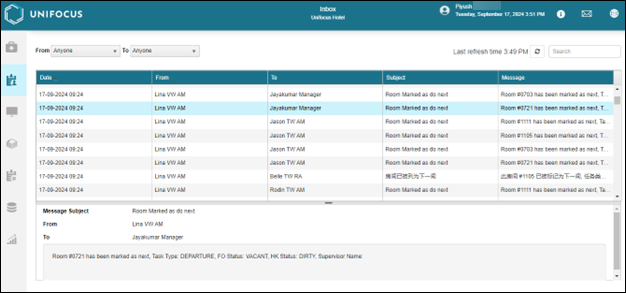
Fields on the Inbox screen
| Field | Description | Notes |
|---|---|---|
|
From / To |
Drop-down lists from which to select sender (From) and recipient (To). |
|
|
Last refresh time |
Time when the screen was last refreshed. |
Read-only. |
|
Refresh |
Refresh the screen. |
|
|
Search |
Search by names, dates, room numbers, and so on. |
|
|
Message table |
The table display messages in your Inbox, filtered based on your selections. |
Read-only. |
|
Message details pane |
This pane displays the details of the selected message in the message table. |
Read-only. |
