Task Details pane in Console
The Task Details pane opens when you right-click a task row in the Console screen and select Task Details.
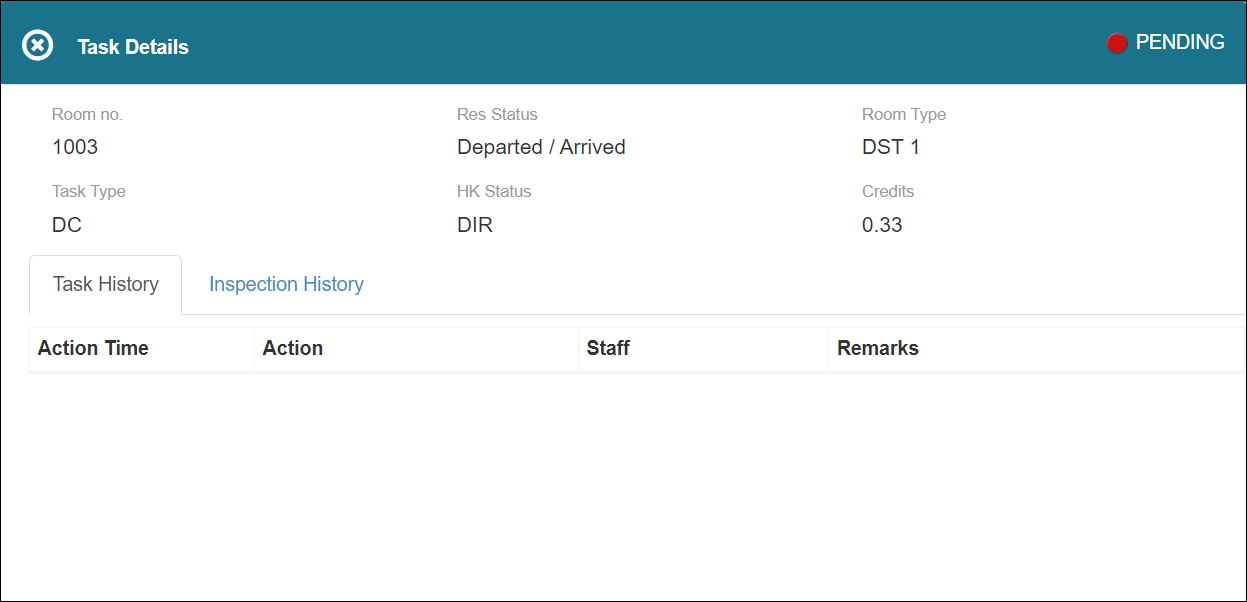
Field on the Task Details pane
| Field | Description | Notes |
|---|---|---|
|
Room no. |
Room number associated with the task. |
Read-only. |
|
Res. Status |
Reservation of the room associated with the task. |
Read-only. |
|
Room Type |
Type of room associated with the task. |
Read-only. |
|
Task Type |
Type of task. |
Read-only. |
|
HK Status |
Room status that is transmitted to the Housekeeping software from the PMS, which denotes whether the room is Dirty, Clean, Inspected, Pickup, Out of Order, or Out of Service. |
Read-only. |
|
Credits |
Credits associated with the task. |
Read-only. |
| Task History tab | ||
|
Action time |
Time when the task was performed. |
Read-only. |
|
Action |
Action associated with the task. |
Read-only. |
|
Staff |
Staff associated with the task. |
Read-only. |
|
Remarks |
Comments associated with the task. |
Read-only. |
| Inspection History tab | ||
|
Status |
Inspection status of the task. |
Read-only. |
|
Inspection Time |
Inspection time of the task. |
Read-only. |
|
Inspected By |
Name of the supervisor who inspected the task. |
Read-only. |
|
Remarks |
Inspections comments about the task. |
Read-only. |
|
Inspection Score |
Inspection score for the task. |
Read-only. |