Today's Arrival(s) screen
The Today's Arrival(s) screen is accessible from the Coordinator's Desk menu of Housekeeping.
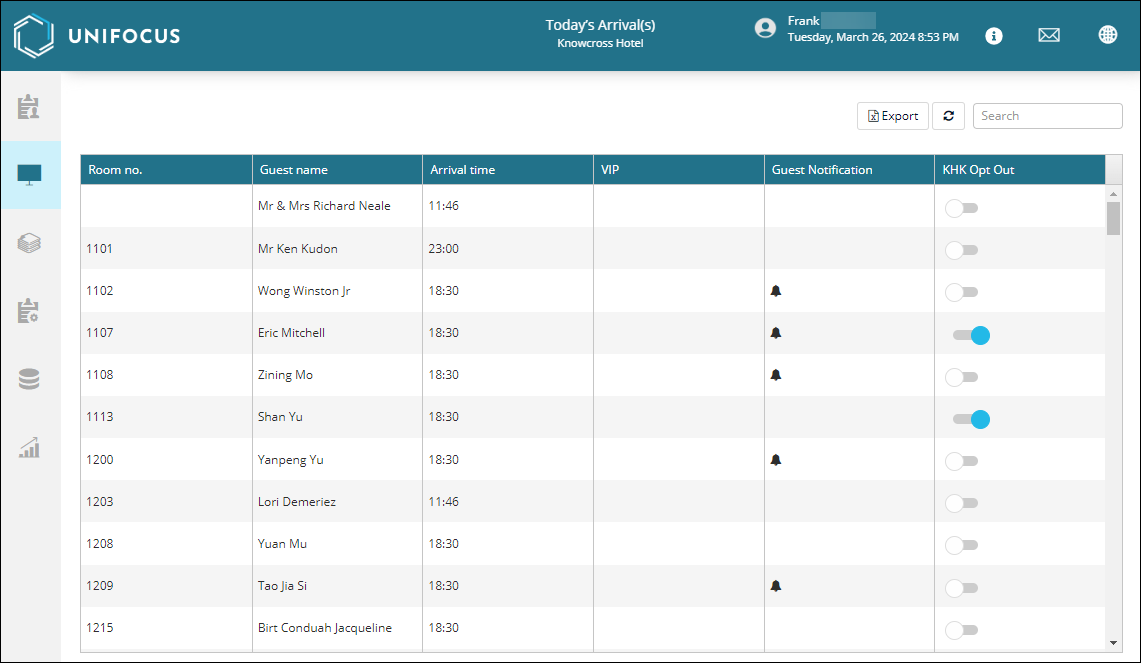
Fields on the Today's Arrival(s) screen
| Field | Description | Notes |
|---|---|---|
|
Export |
Export the screen to an XLSX file. |
|
|
Refresh |
Refresh the screen. |
|
|
Search |
Search by text or number values. |
|
| Table | ||
|
Room no. |
Room number of the guest. |
Read-only. |
|
Guest Name |
Name of the guest. |
Read-only. |
|
Arrival Time |
Guest's arrival time. |
Read-only. |
|
VIP |
Whether the guest has VIP status. |
Read-only. |
|
Guest Notification |
If the guest has a notification, a bell icon ( |
Read-only. |
|
KHK Opt Out |
 —If turned on, the guest is opted in to housekeeping service. —If turned on, the guest is opted in to housekeeping service.
|
|


 ) appears in the row.
 —If turned off, the guest is opted out of housekeeping service.