Editing a rotation plan
-
In the upper-left corner of the screen, select Access your applications (
 ).
).
The menu expands. -
Select Setup > Labor > Rotation Plans.
The Rotation Plans screen appears.
-
In the Select Labor Rotation Plan pane, select the plan you want to change.
The selected plan appears in the Details pane. Click here for field descriptions.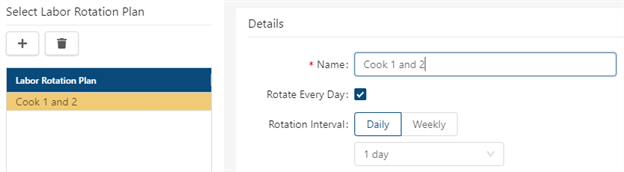
Fields on the Rotation Plans screen
Field Description Notes Audit
View a history of changes to the screen.
Labor Rotation Plans 
Add
Create a new rotation plan.

Delete
Remove the selected rotation plan.
Labor Rotation Plan list
Select a rotation plan from the list to view or make changes to the plan in the Details pane.
Details Name
Name for the rotation plan.
Required.
Rotate Every Day
If selected, an employee cannot work the same assignment for more than one configured Rotation Interval. RMS starts at the top of the assignment list and schedules employees for a new assignment every day until it reaches the bottom of the list, and then the process repeats.
For example, if there are five assignments for Blackjack, the employee's schedule would look like this:
Day 1 = BJ1
Day 2 = BJ2
Day 3 = BJ3
Day 4 = BJ4
Day 5 = BJ5
Day 6 = BJ1
If the check box is clear, an employee is scheduled for the first assignment on the list for the length of time specified in the Rotation Interval, before scheduling the next assignment on the list.
For example, if you chose a Rotation Interval of 3 days, the employee's schedule would look like this:
Day 1 = BJ1
Day 2 = BJ1
Day 3 = BJ1
Day 4 = BJ2
Day 5 = BJ2
Day 6 = BJ2
Rotation Interval
The rotation schedule is based on the selected number of days or weeks.
If Rotate Every Day is selected:
Daily—Interval of time, in days, that determines how much time must pass before that job/assignment can be worked again.
Weekly—Interval of time, in weeks, that determines how much time must pass before that job/assignment can be worked again.
If Rotate Every Day is NOT selected:
Daily—Interval of time, in days, that the same job/assignment can be worked before changing assignments.
Weekly—Interval of time, in weeks, that the same job/assignment can be worked before changing assignments.
Note: If an employee has fewer jobs than the number you have designated as the rotation interval, RMS automatically adjusts the interval to match the number of jobs or assignments.
-
Make changes as necessary.
Your changes are saved automatically.
For more information, seeRotation Plans.