Editing a salary distribution
-
In the upper-left corner of the screen, select Access your applications (
 ).
).
The menu expands. -
Select Setup > Employee > Salary Distributions.
The Salary Distributions screen appears.
-
In the left pane, select the salary distribution that you want to edit.
The selected salary distribution appears in the Details pane. -
Edit the fields as necessary.
 Click here for field descriptions.
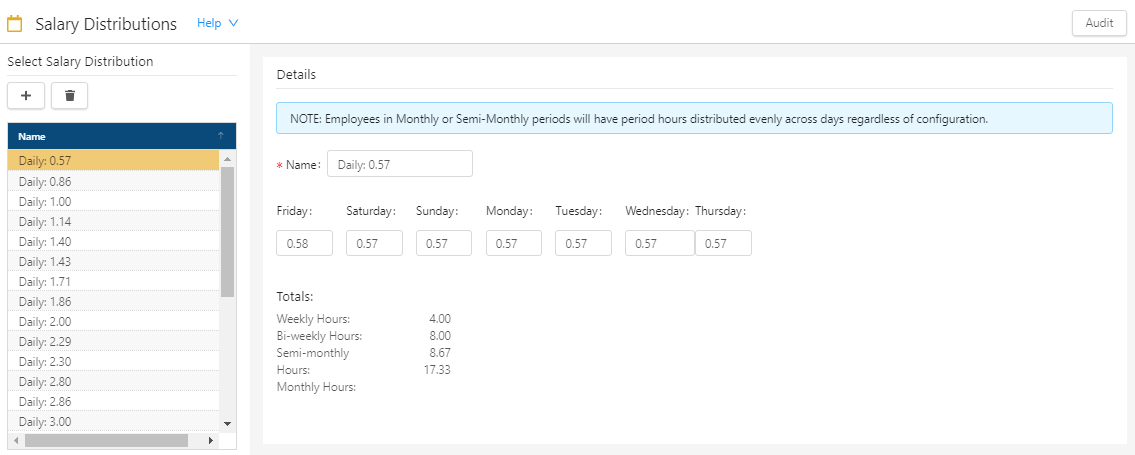
Fields on the Salary Distribution screen
Field Description Notes Audit
View a history of changes to the screen.
Select Salary Distribution 
Add
Opens the Add Salary Distribution dialog box, where you add a new distribution.

Delete
Deletes the selected salary distribution.
This button is available only if a Salary Distribution is selected.
Distributions
Name of the distribution. Select a distribution to view or edit details.
Details Name
Name of the distribution. If you edit the name in this field, the name in the Select Salary Distribution list also updates.
Required.
Days of week
Amount of the distribution for each weekday.
Totals
Displays the following totals:
-
Weekly Hours
-
Bi-weekly Hours
-
Semi-monthly Hours
-
Monthly Hours
Read-only.
Your changes are saved automatically.
For more information, see Salary Distribution. -