Generate Standard Hours dialog box
Use the Generate Standard Hours dialog box to calculate standard hours, that is, the amount of labor that should have been expended for a given period based on the actual business volumes applied to the configured labor standards. This task can also be set up to run automatically as a scheduled task.
RMS generates standard hours using the actuals you provide (see Working with the Enter Actual Hours screen) and the job data you configured. Hours can be generated as far back as 26 weeks.
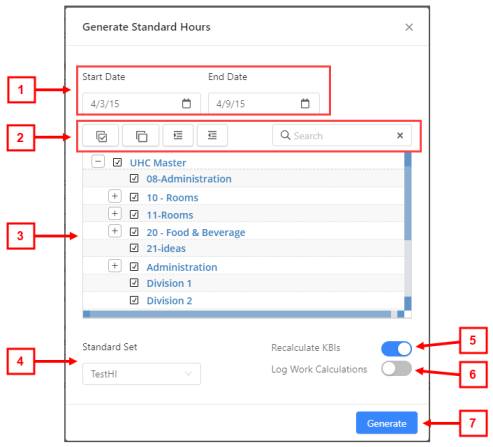
Fields on the Generate Standard Hours dialog box
| # | Field | Description | Notes |
|---|---|---|---|
|
1 |
Start Date |
Start date of the time frame for which to generate standard hours. |
|
|
End Date |
End date of the time frame for which to generate standard hours. |
Default: Last day of the current planning period |
|
|
2 |
Select jobs section |
Jobs to include in the schedule. If necessary, use the following controls to find shifts:
|
You can select one or multiple options. |
|
3 |
Labor structure |
Tree menu of all jobs in the labor structure. |
|
|
4 |
Standard Set |
Standard set to use. Select a standard set from the drop-down list. |
If a standard set is configured to not be used in standard hours calculation (Setup > Standard Sets), it is not available in the drop-down list. |
|
5 |
Recalculate KBIs |
KBI data is recalculated because changes to KBI values or configuration may have occurred and would likely impact the resulting calculation of standard hours. Select on ( |
Default: On. |
|
6 |
Log Work Calculations |
Sends information to a database where Tech Support can troubleshoot internal calculations. Select on ( |
Default: Off. |
|
7 |
Generate |
Generates the schedule and closes the dialog box. |
This button becomes available for selection only after you have selected jobs. |
 )—Selects the check boxes for all organization levels in the tree menu.
 )—Clears the check boxes for all organization levels in the tree menu.
 )—Expands the tree menu to display all organization levels.
 )—Collapses the tree menu to display only top levels of organization levels.
 )—Search field for entering the name of job or organization level. The tree menu updates to match your entry.
 ) or off (
  ).
).