Import Hours pane
Use the Import Hours pane to import worked hours into Unifocus from one or multiple files. See your System Administrator or Unifocus Service Desk for details on file specifications.
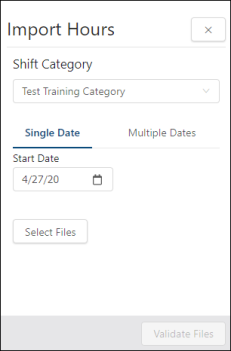
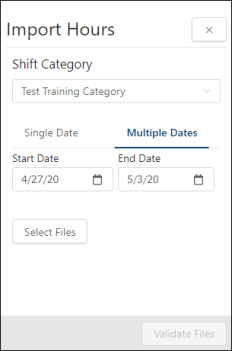
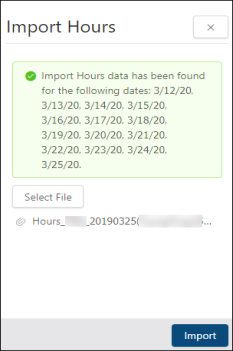
Fields on the Import Hours pane
Note: The fields that you see on the Import Hours pane depend on 1) whether shift categories are configured for your property and 2) the type of class file that is associated with a selected shift category.
| Field | Description | Notes |
|---|---|---|
|
Shift Category |
Select the shift category. Selecting the shift category determines which Import Hours interface to run. The import is based on the configured class file associated with the shift category. |
This field appears only if:
Only configured shift categories appear in the drop-down list. |
|
Single Date |
Import files for a single date. |
This field appears only if the selected Import Hours interface allows for date selection. |
|
Multiple Dates |
Import files for a date range. |
This field appears only if the selected Import Hours interface allows for date selection. |
|
Start Date |
Start date for the import. Select the date from the calendar menu. |
This field appears only if the selected Import Hours interface allows for date selection. |
|
End Date |
End date for the import. Select the date from the calendar menu. |
This field appears only if:
|
|
Select Files |
Opens a file manager window where you can select the desired data file that was created from an outside source. After a file is selected, the file name appears under the Select File button. |
Some variations of Import Hours provide for selection of multiple files. |
|
Validate File |
After you have selected a file for import, select this button to validate the data. You will then be presented with the validation results and a summary of the data that will be imported. |
This button is available only if a file has been selected. |
|
Import |
After you have completed the validation, select this button to import the data. |
This button appears only after a file has been selected. |