Map Property Budget Lines to Master Budget Lines screen
After configuring your master budget structure, this screen can be used to attach the master budget lines globally to property-level budget lines.
Tasks performed from the Map Property Budget Lines to Master Budget Lines screen:
-
Map property budget lines to the master budget structure.
-
Edit a mapping.
-
Remove a mapped budget line.
For more information on tasks, see Working with the Map Property Budget Lines to Master Budget Lines screen.
Fields and controls on the Map Property Budget Lines to Master Budget Lines screen
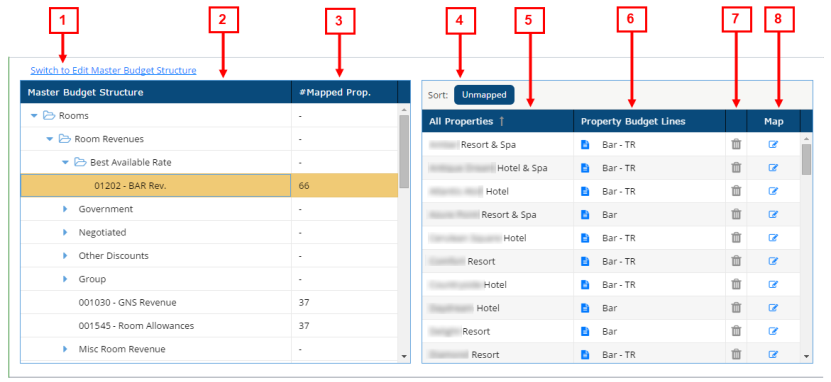
* Personally identifiable information has been obscured or altered in the above image.
| # | Field | Description | Notes |
|---|---|---|---|
|
1 |
Switch to Edit Master Budget Structure |
Click this link to go to the Edit Master Budget Structure screen. |
|
|
|
Master Budget Structure table | ||
|
2 |
Master Budget Structure |
Tree menu of the master budget structure. |
|
|
3 |
# Mapped Prop. |
Total number of mapped properties for the selected budget lines. |
Read-only. |
|
|
Properties table |
This table shows all properties associated with the budget line selected in the Master Budget Structure tree menu. |
|
|
4 |
Sort |
Sort by either mapped or unmapped properties. |
|
|
5 |
All Properties |
Names of the properties associated with the budget line. |
Read-only. |
|
6 |
Property Budget Lines |
Name of the mapped budget line for the selected property. |
Read-only. Text appears only if the budget lines are mapped. |
|
7 |
Remove |
Remove a selected budget line. |
Only available if a property is mapped. |
|
8 |
Map |
Opens the Map Property Budget Lines to Master Budget Structure dialog box where you can map the budget lines to the selected property. |
|
