Understanding labor structures
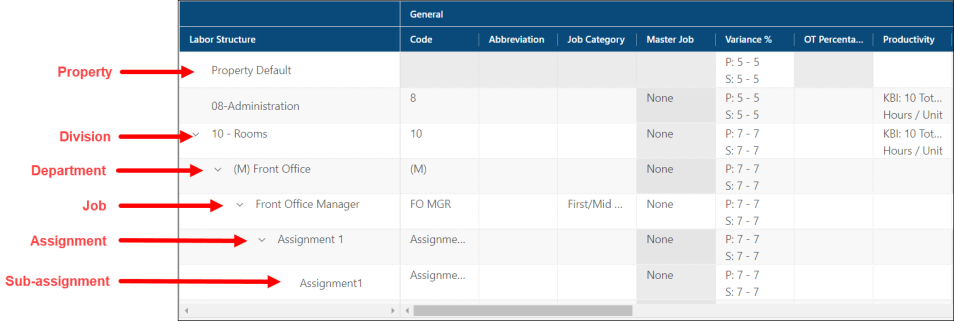
An organization's labor structure typically consists of five or more levels:
-
Property—A property, which is your primary business entity, is the top level of your labor structure. Examples include resorts, casinos, and hotels.
Note: Properties are configured separately in the Property General screen.
-
Division—A division is the second level of the labor structure. Your property might contain several divisions. Examples include Rooms, Food & Beverage, and Operations.
-
Department—Departments are the functional subgroups within a division. For example, in the Rooms division you might have a Front Office department, a Guest Service department, a Housekeeping department, and so on.
-
Jobs—Jobs are functional groups within a department. They are the foundation of RMS labor structure design. Jobs provide vital information to almost every major process in the RMS Labor module. You can create as many jobs within a department as you need; however, they should be based on existing payroll and labor management information. For every job you create, you must specify shift descriptions, shift times, minimum and maximum shift durations, and minimum and maximum position coverage requirements. You can also attach relevant KBIs or assignments to a job.
Note: Any information entered at the job level overrides the same information that was entered at the division or department levels or during Property configuration.
-
Assignments/Sub-assignments—Assignments and sub-assignments specify work locations or tasks that you want to use when configuring standards. (For more information, see Labor Standards.) Assignments allow you to schedule employees for those specific locations or tasks. In a casino, this task/location might be a table (Blackjack table #1) or a section (Slot Section #1, Floor 2). In a restaurant, an assignment can be used to specify certain areas on the restaurant floor such as smoking/nonsmoking sections. The Assignment feature provides the capability of forecasting periods for specific areas and staffing according to that forecast. You can have multiple levels of assignments (sub-assignments), which allow you to be more specific when forecasting and staffing. For example, you might have smoking/nonsmoking sections for both inside and outside seating. Smoking would be an assignment and Inside Seating and Outside Seating would be sub-assignments.
-
Other customizable levels might be available at your property.
Note: Contact your Unifocus Client Success Manager (CSM) if you are interested in customizable labor structure levels.
Note: If you were denied access to Labor Structure during User Administration configuration but allowed access to View Labor Structure, you will not have any editing privileges—you will only be able to view. If you were allowed access to Labor Structure, you will be able to edit all fields. If you were denied access to Labor Structure and View Labor Structure, the Labor Structure option will not be visible in the main menu of RMS.