Events
Use the Events screen to enter and manage event information that can be linked to scheduled and open shifts in Employee Schedules. Events represent scheduled functions or gatherings that require dedicated staffing, resources, and operational support—such as weddings, banquets, birthday parties, fundraisers, corporate meetings, and other hotel-hosted functions.
By associating events with shifts, you can improve scheduling accuracy, ensure adequate staffing coverage, and align labor planning with event-specific needs. Event configuration helps managers clearly identify which shifts are related to special events, enabling better coordination across departments and more effective labor forecasting.
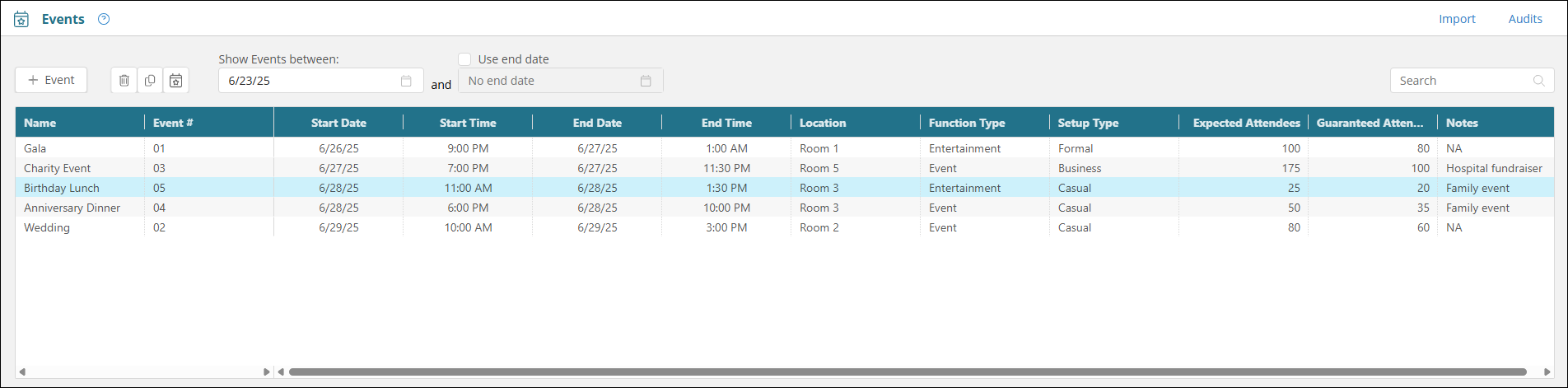
Fields on the Events screen
| Field | Description | Notes |
|---|---|---|
| Controls | ||
|
+ Event |
Opens the Add Event pane where you can enter information for a new event. |
|
|
Delete event |
Delete the selected event. |
This button is available only after you select an event in the table. |
|
Copy event |
Opens the Copy Event pane where you can copy an event to create a new event that is similar to an existing event. |
This button is available only after you select an event in the table. |
|
View Shifts |
Opens the View Shifts pane where you can view shifts associated with the selected event. If necessary, you can also remove event associations from scheduled shifts. |
This button is available only after you select an event in the table. |
|
Show Events between |
Filter the table by events that either occur on a specific date or occur within a specified time frame. Either enter the date in the field(s) or select the date from the calendar menu. |
Default: Only the field for a single date is available. To make the end date field available, select Use end date. |
|
Use end date |
Select this checkbox to make the end date field available for editing so that you can enter a date range. |
Default: Cleared. |
|
Search |
Search for an event.
|
|
|
Import |
Import an Excel file with multiple events. |
|
|
Audit |
View a history of changes to the screen. |
|
| Table | ||
|
Name |
Name of the event. |
|
|
Event # |
Unique identification number associated with the event. |
Required. Character limit: 50. |
|
Start Date |
Start date of the event. |
|
|
Start Time |
Start time of the event. |
|
|
End Time |
End time of the event. |
|
|
Location |
Location on the property where the event will occur. |
|
|
Function Type |
Type of event. |
|
|
Setup Type |
Type of setup required for the event. |
|
|
Expected Attendees |
Number of people expected to attend the event. |
|
|
Guaranteed Attendees |
Number of people guaranteed to attend the event. |
|
|
Notes |
Additional notes about the event. |
|


